This article explains how to track your brand's ranking performance in AI search results over a specific period. By monitoring these trends in the Prompts graph, you can measure the impact of your content optimization efforts and identify opportunities for improvement. You will need access to your Rankbee AI dashboard with an active brand analysis.
- From the main dashboard, navigate to the Prompts section using the left-hand sidebar.
- Ensure your brand is selected in the brand dropdown menu at the top of the page.
- Click the date range selector to choose the specific period you wish to analyze.
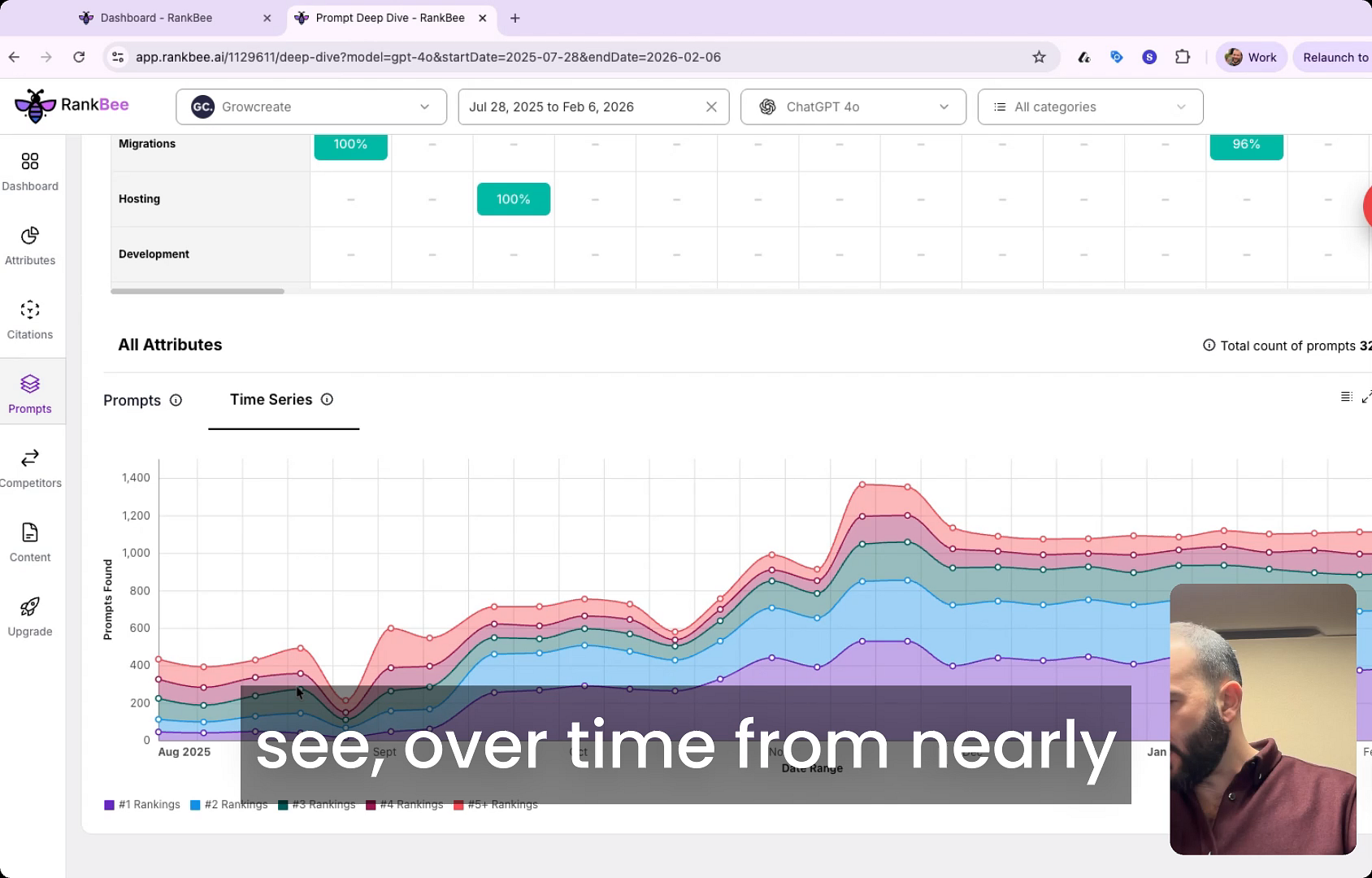
- Review the Time Series graph to visualize your performance. The graph displays the number of prompts where your brand was found in AI-generated answers.
- Use the legend at the bottom of the chart to interpret the data. Each colored line corresponds to a specific ranking position (e.g., #1 Rankings, #2 Rankings), showing you how many times your brand appeared in that position over the selected period.
Summary
This article demonstrates how to use the Prompts graph to monitor your brand's visibility and ranking in AI search over time. This feature allows you to track progress, validate your content strategy, and make data-driven decisions to improve your brand's standing.